Genmitsu PROVerXL 4030S Resources
 Updated
Introduction
This compendium is the collection of resources for Genmitsu PROVerXL 4030S provided by SainSmart and community members.
You can join our Facebook group for discussions and project ideas for your new CNC machine.
Assembly
- Download the USB Stick Content (Click to download)
- PROVerXL 4030S User Manual (Click to view PDF version of user manual)
- Assembly Video
Extension Kit
- Genmitsu 4030 to 6060 Expansion Guide: You can make your 4030S bigger, much bigger! This guide covers the upgrade process in great detail.
6060 Extension Kit
- 6060 XY-Axis Extension Kit Installation Guide (Click to view)
- 6060 Hybrid Spoilboard Installation Guide (Click to view)
1010 Extension Kit
- 1010 XY-Axis Extension Kit Installation Guide (Click to view)
- 1010 Hybrid Spoilboard Installation Guide (Click to view)
CNC Controller Software Installation
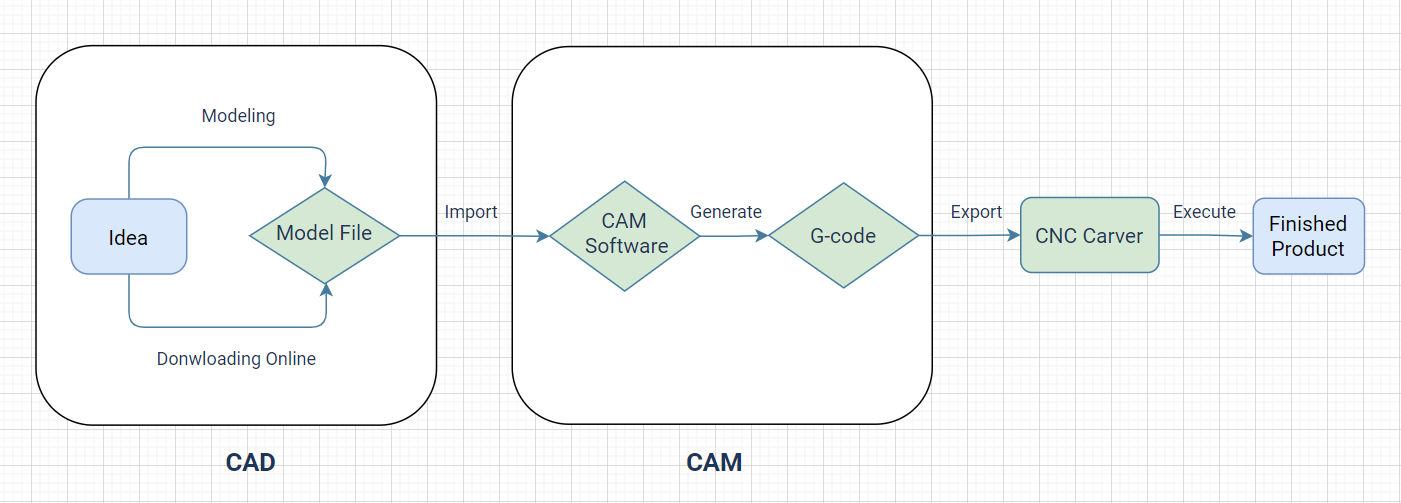
(img source from web)
Driver
Installing the CH341SER driver will allow your computer to recognize the CNC controller board as a serial device, which can then be used with Candle or other CNC control software.
- CH341SER Driver (For Windows): If windows does not do so automatically when you connect your CNC to the computer for the first time, this downloadable file is the Driver which is needed for your computer to be able to communicate with your CNC.
- CH341SER Driver (For Mac): This driver will not install automatically and must be installed as dictated by instructions included in the .zip which this link will download.
- CH341 Installation Guide: Although this guide is about CH340, it also applies to CH341. CH341 is a newer version of the CH340 and has some added features. CH341 supports I2C, SPI, and 8-bit parallel bus interfaces, whereas CH340 only supports serial communication.
Control software
Genmitsu APP
UGS (Universal G-code Sender) for MacOS, Linux, and Windows Users
- UGS is a cross-platform software application that runs on Windows, Mac, and Linux operating systems. You can download and install UGS on your computer to communicate with your CNC machine.
- UGS is an open-source software and has an active user community, so you can find a lot of resources and support online.
- Click here to download UGS
- The UGS Wiki is a comprehensive resource that covers everything from installation to advanced usage. It includes tutorials, FAQs, and troubleshooting guides. You can access the UGS Wiki at https://winder.github.io/ugs_website/guide/platform/.
Candle (Optional for Windows users)
- How to Install Candle/GRBLControl for Windows
- GRBLControl/Candle 1.17 (For Windows): Link downloads a .zip file containing a full copy of Candle, the software you can use to run your CNC through your computer. Must unzip the entire folder to use.
Machine Operation
- Guide on How to Set Up & Use Candle for Multiple Operations
- Offline Controller User Guide
- What is a Z-Probe & How to Use It (For use with Candle only for the 4030, the offline controller section is not applicable. See Offline Controller user guide linked above for more on Z probe use for 4030 with offline controller)
- How to Use Limit Switches to Maintain Positional Accuracy Between CNC Operations
- CNC Bit Selection Buyers Guide
Troubleshooting
- GRBL Error Code List & Meaning: Whenever something goes wrong with your CNC, GRBL tries its best to provide you with an error code to help you diagnose and resolve the issue you are having. This information is invaluable in getting your CNC back up and running, so we suggest keeping an eye out for error codes and including this information if you need further support from us.
- CNC Router Troubleshooting (Click to view more)
- Abnormal Noise Debugging:
- Step 1: Adjust the Motor Screws
- Step 2: Adjust the Motor and Aluminum Mounting Bolts
- Step 3: Reinstall the Coupling
CNC Upgrade Resources
- The Beginner’s Guide to Genmitsu CNC Upgrade & Accessories
- How to Install & Use a DeWalt 611 Router with a 4030 CNC
Other CAD/CAM Software
- Fusion 360 Guides:
- Carveco Maker:
- Easel:
- Link to Website (No download necessary, registration required to use)
- Vectric V-Carve (Desktop version is available on SainSmart.com)
